
What Is Claude AI? The Models, Plans and Surfaces Anthropic Actually Publishes
Guides & Insights
Author
Rowan SterlingDate Published
Anthropic explains what Claude is in the FAQ below its pricing table. Claude is an artificial intelligence (AI) assistant. Anthropic trained it using a method called Constitutional AI to make it safe, accurate and secure. The company describes Claude as a trusted assistant that helps you do your best work. That explains what Claude is, but it does not explain which Claude product someone might be using. Anthropic's website lists seven products, nine capabilities and four model families. Some names sound similar, even though they describe different things. This article explains what Anthropic offers, what comes with each personal plan, and one important number the company does not share. When an exact model price is needed, it uses Claude Opus 5.5 because Anthropic clearly publishes that model's price.
One reason this gets confusing is that people asking about Claude may want two very different things. One person wants a place to type questions and get answers. Another wants to connect Claude to software using code. Anthropic offers both, but they have different pricing pages and different ways of charging. One uses subscriptions. The other charges for tokens, which are small pieces of text that AI models process. Neither pricing page fully explains the other.
What Claude is and its five plans
Anthropic's FAQ explains more than just what Claude is. It says you can use Claude for your own work or create a Team account to work with other people. It also names five pricing plans: Free, Pro, Max, Team and Enterprise. So Anthropic officially offers five plans. But its pricing page does not show all five together.
At claude.com/pricing, the plans are split into two groups. Free, Pro and Max are personal plans shown next to each other. Free is for everyone. Pro is for everyday work. Max is for people who use Claude throughout the day. Team and Enterprise are for groups and businesses. They are priced for each person, or seat. So the total is three personal plans plus two business plans, making five.
It helps to understand three different words. A product is the tool or place you use. A plan decides which tools and features you can access. A model is the AI system that gives you answers. Many people get confused about Claude because they mix up these three things.
Seven products and nine capabilities
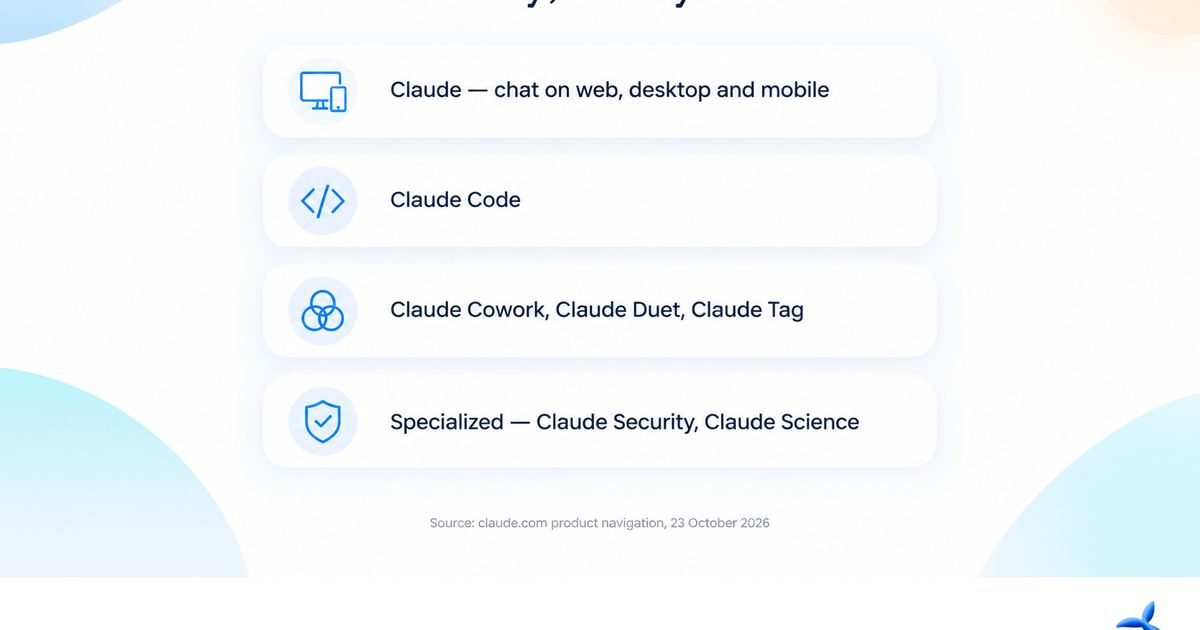
Anthropic's product menu shows five main products: Claude, Claude Code, Claude Cowork, Claude Duet and Claude Tag. It also has a Specialized section with Claude Security and Claude Science. That makes seven products altogether. Cowork, Duet and Tag can be especially confusing because their names do not clearly explain what they are. But Anthropic lists each one as a separate product, not simply as a feature.
Anthropic also lists nine capabilities: Artifacts, Design, Connectors, Plugins, Skills, Extensions, Claude in Chrome, Claude for Google Workspace and Claude for Microsoft 365. These are not nine separate products. They are things Claude can do or ways it can work inside other companies' software. Anthropic itself makes this distinction. It is not a ranking of which tools are better. For example, Design appears under Capabilities, but Claude Design is also included in the Free plan. That is possible because a capability can be included inside a product without becoming a separate product.
The menu is also changing. Anthropic's pricing page has a notice saying, "Claude Cowork is now just Claude. Rolling out to Pro and Max, with more plans to follow." But the product menu still shows both names. This means the change is happening, not necessarily finished. As of October 23, 2026, both names still appear on the website, and Anthropic is moving toward combining them.
Claude's main offer is that you can use the same account across different devices. You can continue conversations on the website, in the desktop app and on your phone. This is one of the first benefits listed for the Free plan. It also helps explain how several Claude products can appear together in one menu.
Four model families and what their names mean
Anthropic's model menu lists four families: Mythos, which includes Fable; Opus; Sonnet; and Haiku. A family name tells you where a model fits in Anthropic's range of models. It does not guarantee exactly what the model can do. Each family also has version numbers. You choose a specific version when you use a model. On October 23, 2026, Anthropic's pricing table listed Fable 5.1, Opus 5.5, Sonnet 5.5 and Haiku 5.5. These are the four families with their specific version numbers.
The plan comparison table shows which model families you can use with each plan. Sonnet and Haiku are included in every plan, including Free. Opus is not available on Free but is included starting with Pro. Fable has its own row and is not included in Free. Anthropic also mentions usage credits and says usage limits apply. So if you use Free and want to switch models, you can choose between two of the four families, not all four.
Farther down the pricing page, Anthropic gives exact prices for using models through its platform. These prices are for every one million tokens. Fable 5.1 costs $10 for input and $50 for output. Opus 5.5 costs $4 for input and $20 for output. Sonnet 5.5 costs $2 for input and $10 for output. Haiku 5.5 has two price levels. For prompts of up to 100,000 tokens, input costs $0.10 and output costs $0.50 per million tokens. For prompts above that size, input costs $0.50 and output costs $2.50. Reading previously cached information has separate prices. These range from $0.20 per million tokens for Opus 5.5 to $0.01 for the smaller Haiku tier. Both the plan table and platform table say the context window, or the amount of information a model can work with at once, can reach 1 million tokens, depending on the model.
The biggest difference is not the prices themselves. It is what Anthropic tells you about them. The company clearly says that one million input tokens for Opus 5.5 cost $4. But it does not say how many tokens you can use with a $20 Pro subscription. The platform prices are exact. The subscription limits are not published as exact numbers.
What you get with Free, Pro and Max
Free costs $0 and is available to everyone. You can chat with Claude on the web, desktop and mobile. You can search the web, create files and run code. Claude can remember information across conversations and connect to your apps and tools. The plan also includes Artifacts, Claude Design, Claude Slides and Claude Docs. You can have up to five Projects. This is the one part of the personal plan comparison where Anthropic gives an exact count instead of just comparing one plan with another.
Pro costs $17 per month when you pay for a full year, with $200 charged up front. If you pay month by month, it costs $20 per month. Pro includes everything in Free, plus more usage, the ability to hand off and schedule tasks, Claude Dashboards in beta, Claude Code, Claude Science, Projects, more Claude models, Claude in Chrome and Claude for Microsoft 365. Two especially useful additions are Claude Code and the connections to Chrome and Microsoft 365. These let Claude work with software beyond Anthropic's own apps.
Max starts at $100 per month. It is meant for people who use Claude all day. It includes everything in Pro, plus a choice of 5 times or 20 times as much usage as Pro. It also gives you higher output limits for all tasks, early access to advanced features, priority access when many people are using Claude, and $100 to $200 per month in API credits for building with the Claude Platform. Two benefits need a little explanation. Priority access helps you get service when the system is busy. It does not mean you have unlimited usage. API credits are also different from your subscription usage. They pay for using Claude models through the platform, as explained below.
The important number Anthropic does not share
Anthropic does not publish an exact token allowance for any personal subscription plan on claude.com. Its pricing page only compares usage between plans. Pro gives you more usage than Free. Max gives you 5 or 20 times as much usage as Pro, depending on the option you buy. Anthropic does not give an exact usage number for Free. It also does not publish a fixed number of messages, a monthly pool of tokens or a subscription credit balance for these plans.
Anthropic's own small print says: "Usage limits apply. Prices shown don't include applicable tax. Price and plans are subject to change at Anthropic's discretion." This notice appears twice on the pricing page. It tells you that limits exist, that taxes are extra where they apply, and that Anthropic can change prices and plans. But it does not tell you how large the usage limits are.
In everyday terms, Anthropic's website does not give a clear number to answer the question, "How much Claude can I use for $20?" If another website gives an exact number, that number comes from someone's measurements, not from an official limit published by Anthropic. The 5x and 20x comparisons still mean something. Anthropic says the 20x Max option gives twenty times the usage of Pro. But if you do not know the exact Pro allowance, you cannot calculate an exact Max allowance either. Think of "more usage" as a comparison, not a fixed amount you can plan around.
Max has one clear connection between subscription pricing and token pricing. Its $100 to $200 in monthly Claude Platform credits can be spent using the published prices per token. That means you can calculate how many tokens those credits could buy. The other personal plans do not provide this same connection. If you need an exact cost before deciding, Anthropic's platform pricing table gives you numbers, but its subscription comparison does not. This is a difference in what Anthropic has chosen to publish, not missing research.
Team and Enterprise are bought differently
Anthropic separates its business plans from its three personal plans. Team and Enterprise are priced per seat, meaning per person using the service. Enterprise also offers the option to speak with a sales specialist. Team is designed for groups of 2 to 150 people. Enterprise is meant for large businesses that need to use Claude across their operations. These plans include business features such as single sign-on, audit logs that record activity, access based on a person's role, custom rules for keeping data, and an offering designed to support HIPAA requirements. These features are not listed in the personal plan comparison.
For someone new to Claude, the important point is simple. Free, Pro and Max are the personal plans you can compare by price. Team and Enterprise are for organizations, where buying decisions often involve a company budget and an IT department. They are not simply the next level above Max. If you only want to know what Claude costs for one person, the three personal plans are the relevant choices.
A subscription and an API are different things
Another common question is why someone with a paid Claude plan might still need an API key. The reason is that a subscription and an API pay for different things. A subscription lets you use Anthropic's Claude products and features. An API key lets software made by other developers send requests directly to Claude models. They have different prices, different limits and different uses. A Pro subscription does not come with a set balance of tokens. An API key also does not automatically give you access to Claude Code as a subscription product. The main connection is Max, which includes Claude Platform API credits as an extra benefit of the subscription.
If you are building software that sends requests to an AI model, comparing Claude subscriptions is not the right starting point. OrcaRouter provides access to models, not Anthropic's apps or other companies' AI assistants. So an OrcaRouter API connection does not replace a Claude subscription. Instead, OrcaRouter makes it easier to connect software to models. It offers one interface that works with the OpenAI API format and gives access to more than 200 models using one key. It charges the model provider's listed prices without adding a markup. It can also automatically switch to another provider if one temporarily has problems. Claude Opus 5.5 is available through OrcaRouter at $4 per million input tokens and $20 per million output tokens. It supports a context window of 1 million tokens, and cached reads cost $0.20 per million tokens.
The model pricing table tells you what it costs to use Claude through the platform. It does not tell you what a Claude subscription includes. Both tables mention the same four model families, which makes them seem similar. But the two ways of paying are not interchangeable.
If you are new to Claude, ask three questions
First, decide which product you need. If you want to type messages to an AI assistant that can remember your conversations, use Claude. The Free plan includes this. If you want Anthropic's tool for developers, look at Claude Code, which starts with Pro. If you work in security or scientific research, check Claude Security and Claude Science under the Specialized section before choosing a general product.
Second, choose a plan. Free is a real free plan, not just a short trial. It limits you to five Projects and gives you access to two model families. Pro opens up more tools, including Claude Code, Projects, browser and Microsoft 365 connections, and Opus in addition to Sonnet and Haiku. Max mainly gives you more usage. It makes sense when you already know you need more capacity than Pro provides.
Third, choose a model when you actually need to. Start with the family. Opus is the top-of-the-line option, Sonnet sits in the middle, Haiku is suited to handling larger amounts of work, and Fable has its own place in the lineup. Then check the version number. A family name alone does not tell you exactly which model version you are using. On Free, the plan already limits your choices. With other plans, checking the version matters before you depend on a particular model.
Anthropic's product menu will keep changing. The current change from Claude Cowork to Claude is one example. But the basic structure is likely to stay familiar for a while: a short list of products, a longer list of capabilities, four model families, three personal plans, and usage limits described mainly through comparisons. Once you understand those differences, future name changes should be much easier to follow.