
Apple’s Response to AI Agents Accessing Your Data Is to Scare You Into Saying No
macOS will now show a clear warning explaining what happens when you give an app Full Disk Access.
EXPERT OPINION BY JASON ATEN, TECH COLUMNIST @JASONATEN
One of the best things about the Mac is that you can do almost anything you want with it. It is a computer. You can run software on it and let that software control different parts of your device. But this freedom also has a dangerous side. You can give an app access to all your information, even if you do not fully understand what that means.
This has become easier to see as AI agents become more popular. These tools can do some amazing things, especially when they can access lots of information.
The problem is that AI agents sometimes do things people do not expect or things they should not do. This can cause serious problems if they can access your private information. Your Mac stores your emails, messages, photos, and files. So, if an AI agent does something unexpected, it could put users in a very bad situation.
Apple understands this risk. That is why the company has made a major change in macOS 27.3 beta 2. The goal is to make it much harder for people to give apps access to their data by accident. Even when people choose to give access, Apple wants them to understand exactly what they are allowing. The company's plan seems simple: show such a serious warning that people will think very carefully before giving an app Full Disk Access.
The changes began in October, after several reports said that Meta's Muse AI agent was doing things like uploading all of my text messages. This caught the attention of many people, including, it seems, some people at Apple. Apple published a message for developers explaining that too many apps were asking for Full Disk Access for reasons that went beyond what the feature was originally designed to do. Apparently, it was first meant for apps that back up computer disks.
Now, Apple will encourage users to give apps access only to the specific folders they need, rather than giving them access to the entire computer. Apple is also making the permissions for Accessibility features clearer. These features can let apps control your device. The company is also creating separate controls for something now called System & App Protection Override. In addition, a new symbol in the menu bar will appear whenever an app is controlling another app or part of the device.
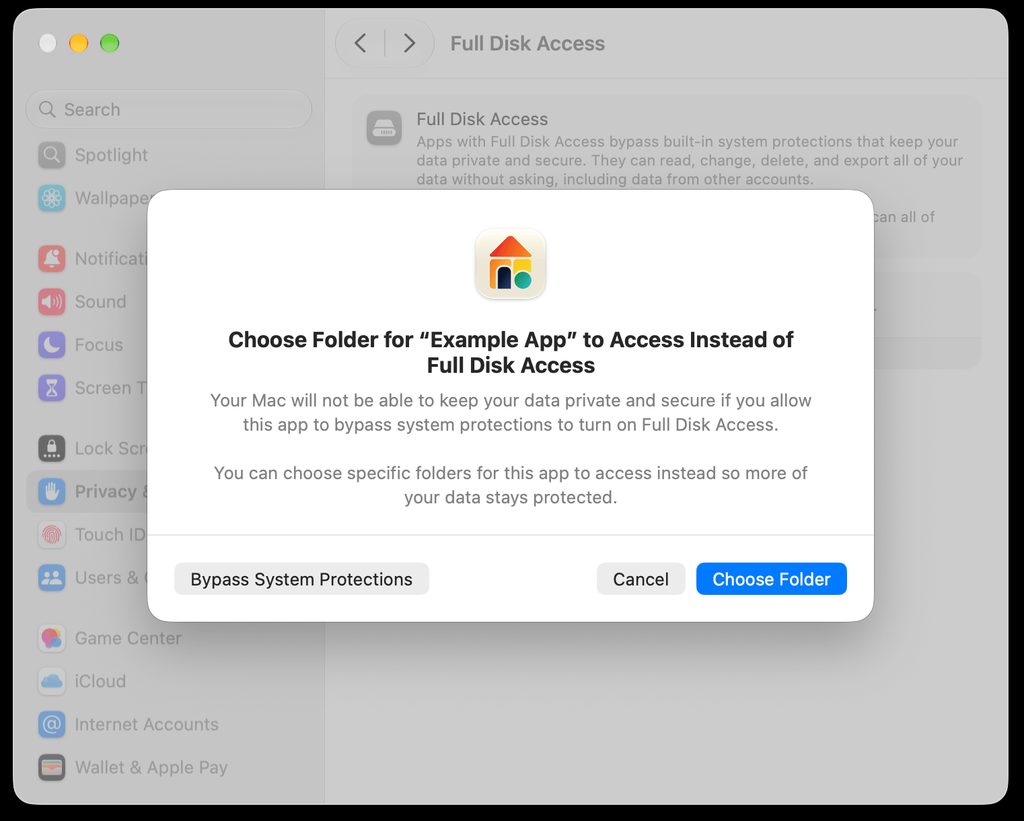
But the most interesting change is the warning people will see when an app asks for Full Disk Access. It says: “Your Mac will not be able to keep your data private and secure if you allow this app to bypass system protections to turn on Full Disk Access.”