
Agentic AI Architecture And Enterprise Security In Multi-Agent Systems + Video - Undercode Testing
Introduction:
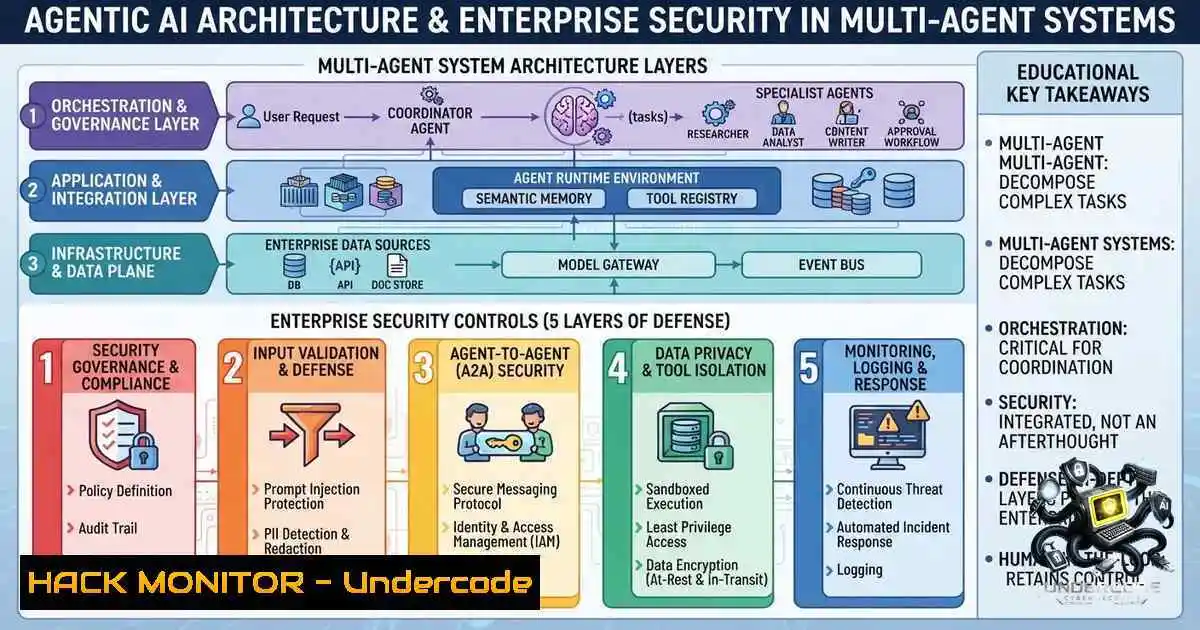
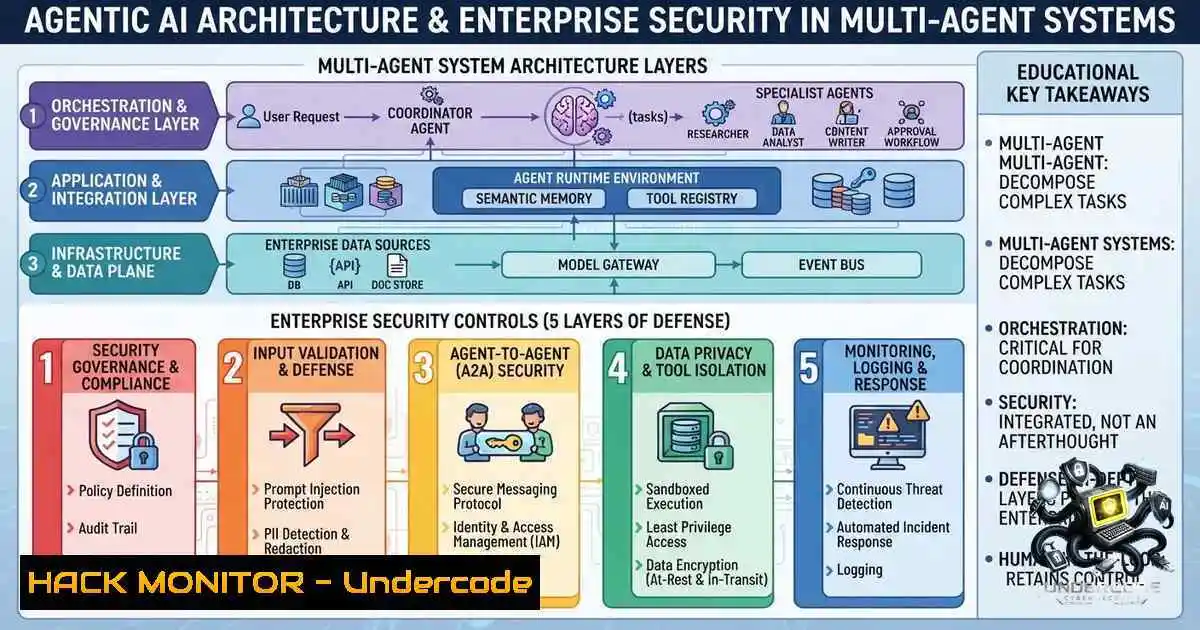
Agentic AI changes how businesses use artificial intelligence. Instead of only creating text, these AI systems can make plans, use tools, and complete tasks with several steps across cloud services and data systems. When combined with platforms such as Microsoft Azure, Microsoft Fabric, and Copilot Studio, as well as cybersecurity and digital forensics practices, these agents can help businesses work faster. However, they also create more possible ways for attackers to break into company systems. As businesses use more agents, they must protect user identities, API connections, and the environments where agents run.
Learning Objectives & Secrets:
Learn how to build business solutions that use AI agents and how to coordinate multiple agents across Microsoft AI platforms and business data systems.
Learn how to give agents only the permissions they need, limit API access, and carefully check tool actions to prevent prompt injection and attempts to gain extra permissions.
Learn how to collect system activity data, keep audit records, and control running agents across Linux, Windows, and cloud systems.
You Should Know:
1. Agent-Based Business Solutions and Multi-Agent Coordination
AI-based business solutions break large business goals into smaller tasks. Different agents handle different jobs. For example, one agent may make plans, another may find information, another may run code or work with data, and another may check the results. These agents work together using organized information and clearly defined tools. Instead of using one large prompt to handle everything, a multi-agent system gives each agent a separate responsibility, clear inputs, specific data formats, and limited permissions. When agents connect to platforms such as Microsoft Fabric and Azure, they may work with business reports, start workflows, and use external APIs. For important actions, businesses must carefully check data formats and include human approval steps.
Step-by-step guide explaining what this does and how to use it:
- Give each agent a clear role, such as planner, information finder, task executor, or reviewer. Use defined JSON input and output formats so agents cannot send unrestricted instructions to tools with special permissions.
- Place a security gateway between the agent coordinator and the APIs or databases it uses. This gateway should check input values, request limits, and user permissions before allowing an action.
- Record every tool call, its input data, a summary of its output, and its approval status in one central audit log. These records help with investigations and compliance checks.
- Test possible problems before using agents in production. These tests should include tool timeouts, incorrect responses, and harmful instructions hidden inside documents or other retrieved information.
- Microsoft AI, Copilot Studio, and Business Data Connections
Businesses using Microsoft's AI ecosystem can connect conversational and autonomous agents in Copilot Studio to cloud services, identity systems, and data analysis platforms. Connectors make these connections faster, but poorly controlled service accounts, connectors that have not been reviewed, and overly broad data permissions can expose sensitive business reports and internal APIs. To secure these connections, businesses should use Microsoft Entra ID conditional access, limit outgoing network connections, and keep read-only data queries separate from actions that change business records or settings.
Step-by-step guide explaining what this does and how to use it:
- Check every connector and custom action in the agent platform. Give each one its own credentials with only the permissions it needs. Do not use shared administrator credentials.
- Use network isolation and TLS certificate checks to protect backend APIs and data services that agents and worker systems access.
- Keep testing and production environments separate. Experimental prompts and new tools must not be able to access live production data or start real business workflows.
- Automatically check the settings of your computers and cloud systems. Verify that services, firewall rules, and active sessions are configured correctly.
 Linux: Inspect active network listeners, firewall status, and recent auth/syslog events
ss -tulpn
sudo ufw status verbose || sudo iptables -L -1 -v
sudo journalctl -u ssh --since "24 hours ago" --1o-pager | tail -1 30
 Windows: Check firewall profiles, active TCP listeners, and recent security/PowerShell logs
Get-1etFirewallProfile | Format-Table Name, Enabled, DefaultInboundAction, DefaultOutboundAction
Get-1etTCPConnection -State Listen | Select-Object LocalAddress, LocalPort, OwningProcess
Get-WinEvent -LogName Security -MaxEvents 20 | Select-Object TimeCreated, Id, Message
- API Security and Tool Protection for Autonomous Agents
Autonomous agents can choose and use external APIs on their own. This makes API security an important way to protect systems against indirect prompt injection and confused-deputy attacks. For example, an attacker might hide harmful instructions in a webpage, document, or support ticket that an agent reads. The instructions may try to trick the agent into sending private information to an external webhook or using an administrator API. To prevent this, businesses should allow only approved websites and API endpoints, check all input values on the server, use short-lived tokens with limited permissions, and use signed requests or mutual TLS when appropriate.
Step-by-step guide explaining what this does and how to use it:
- Set a clear list of approved API hosts, HTTP methods, and resource paths in the tool execution proxy. Block private IP address ranges (RFC 1918 and link-local metadata endpoints) to help prevent Server-Side Request Forgery (SSRF) attacks.
- Ask for clear confirmation or additional authorization before allowing actions that change data or settings, such as deleting records, changing permissions, or sending messages outside the organization.
- Remove or hide passwords, session tokens, and sensitive personal information from prompts, tool responses, and the information provided to AI models.
- Check API responses and set strict time limits. This prevents slow or harmful endpoints from blocking queues of tasks handled by multiple agents.
- Cloud and Computer Security for Agent Systems and Worker Nodes
Multi-agent systems often run background workers, containers, or isolated environments on Linux and Windows computers in the cloud. If an agent's code execution tool or connector worker is compromised, attackers may try to move into other systems, steal credentials from cloud metadata services, or keep access to the affected computer. Securing the computers that run these agents can reduce the damage. Important protections include running containers without administrator privileges, removing unnecessary Linux permissions, disabling older Windows protocols, and protecting cloud metadata services.
Step-by-step guide explaining what this does and how to use it:
- Run agent workers and tool sandboxes as normal users without administrator privileges. Use read-only root filesystems when possible, and allow outgoing network connections only to required services.
- Protect cloud instance metadata endpoints. For example, use IMDSv2 hop limits or similar cloud security settings to make it harder for workloads to obtain powerful computer credentials.
- Keep operating systems, container software, and programming language dependencies updated. Also check file integrity and watch the processes running on host computers.
- Use standard security checks to make Linux and Windows computers more secure.
 Linux: Check running processes, SUID binaries, and non-root user execution context
id
ps aux --sort=-%cpu | head -1 15
find / -perm -4000 -type f 2>/dev/null | head -1 25
 Windows: Inspect local administrators, Defender status, and running services
Get-LocalGroupMember -Group "Administrators" | Select-Object Name, ObjectClass, PrincipalSource
Get-MpComputerStatus | Select-Object AntivirusEnabled, RealTimeProtectionEnabled, IoavProtectionEnabled
Get-Service | Where-Object { $_.Status -eq 'Running' } | Select-Object Name, DisplayName | Select-Object -First 20
5. Reducing Security Risks, Digital Forensics, and Incident Response
Combining cybersecurity, digital forensics, and AI engineering helps security teams find, stop, and investigate unusual agent activity quickly. For example, an agent might repeat the same task endlessly, access unusual database tables, or make unexpected API calls to external services. Security teams need protected logs that cannot be changed, tracking IDs that connect activity across agents, and clear plans for stopping incidents. Regular security tests that simulate prompt injection and misuse of tools, together with proper evidence protection, help organizations build reliable security practices instead of only reacting when something goes wrong.
Step-by-step guide explaining what this does and how to use it:
- Use a unique tracking ID for every agent task. Pass this ID through every agent, API gateway request, database operation, and cloud service call. This makes it possible to rebuild the full chain of activity later.
- Set up alerts for unusual activity, such as sudden increases in tool usage, connections to unfamiliar websites, or repeated login and permission failures.
- Create an emergency stop switch or circuit breaker for every agent and tool connector. This allows security teams to disable a faulty feature immediately without stopping unrelated systems.
- During security incidents, preserve temporary memory, container logs, and API gateway records. Follow digital forensics procedures that protect the evidence and record who handled it.
What Undercode Say:
Treat all information from external sources and all tool results used by an AI agent as untrusted data. Check and control this information before allowing an agent to use it.
Combine fast AI development and business automation with limited user permissions, controls over outgoing network connections, and complete monitoring of system activity.
Businesses are using agentic AI and multi-agent systems more quickly across software development, data analysis, and daily business operations. This growth is supported by platforms that connect language models to real business tools and data. These systems can greatly improve automation and productivity, but they also create complex and less predictable paths of activity. AI model decisions can interact with live APIs, login credentials, and computer systems. Security teams should not depend only on system prompts to enforce security rules because the model receives both instructions and retrieved information in the same context. Instead, security must also be enforced outside the AI model through gateways, identity rules, isolated execution environments, and strict data access controls. Businesses that combine good software engineering, early threat analysis, and detailed system monitoring can use AI agents more safely and effectively. Businesses that give autonomous agents too many permissions risk exposing private information, allowing unauthorized actions, and causing complicated incidents across several systems.
Expected Output:
Introduction:
To secure agentic AI workflows, businesses must give agents only the permissions they need, control API access through security gateways, and isolate the environments in which agents run. Without strong identity controls and monitoring for unusual activity, multi-agent systems can become fast-moving tools for stealing data, abusing permissions through malicious prompts, and spreading attacks across cloud systems.
What Undercode Say:
Use reliable security checks and limited permissions at the API and data layers instead of trusting AI-generated output alone.
Keep complete activity records and emergency stop controls across multi-agent systems and the cloud computers that support them.
-P Businesses that use standard zero-trust API gateways, limited agent identities, and continuous activity monitoring will be able to expand multi-agent automation across important business tasks more safely.
-P Organizations that include cybersecurity, cloud protection, and digital forensics in their AI architecture from the beginning will find and stop unusual agent activity more quickly.
-1 Attackers will increasingly try to hide harmful instructions in shared documents, support tickets, and web tools. These indirect prompt injection attacks may cause agents with too many permissions to make unauthorized API calls and expose private data.
-1 Poorly configured connectors, service accounts with excessive permissions, and autonomous agents that run without proper monitoring will cause expensive service interruptions and compliance problems in systems with weak security.