
Anthropic Adds Smart Reports, Surveys, Pooled Budgets to Claude Enterprise
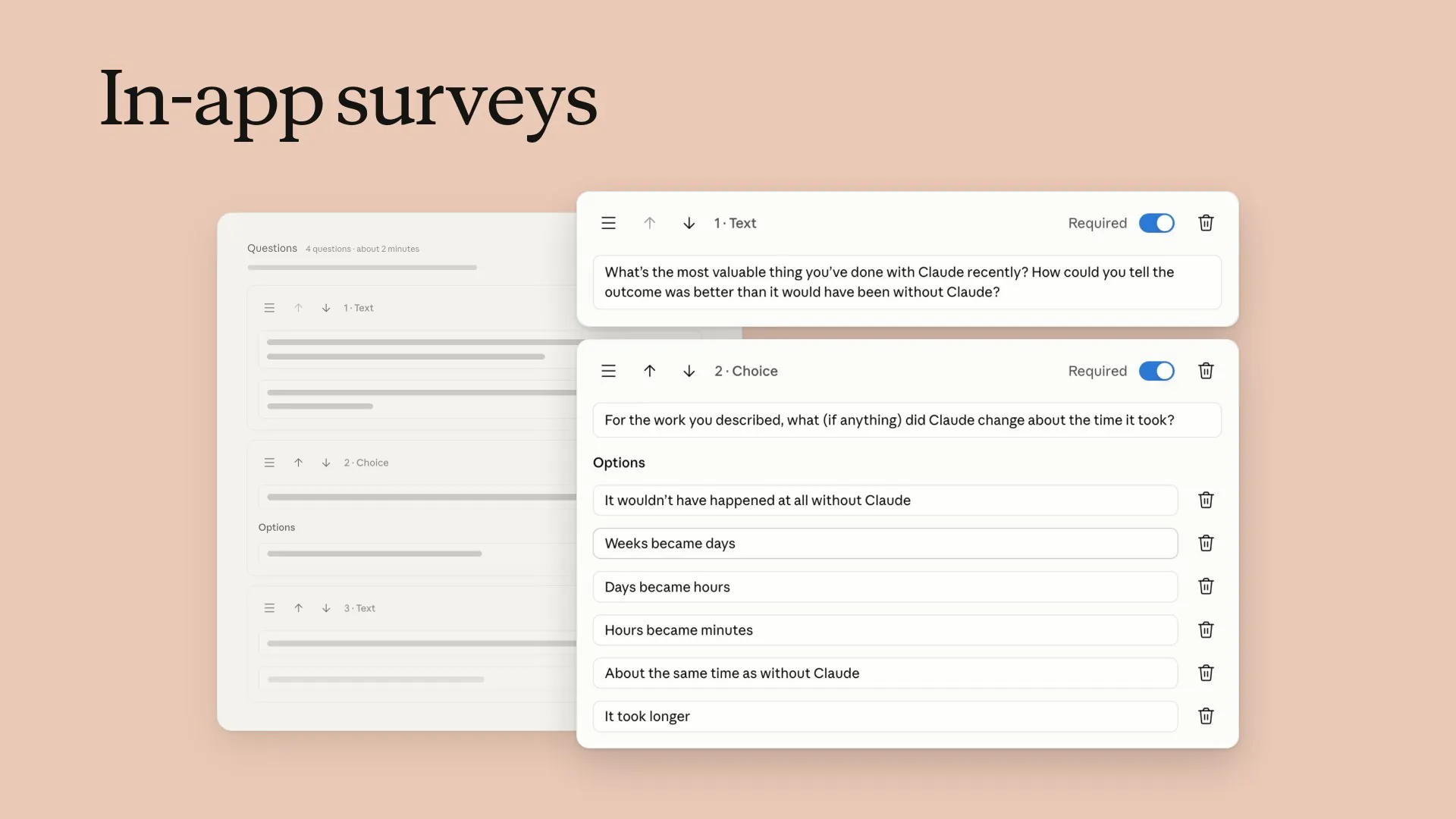
Anthropic made three new Claude Enterprise features available to all eligible users on October 28, 2026. These features are smart reports, which analyze what teams do with Claude and how much it costs; surveys inside the app, which collect feedback from employees; and shared group budgets, which give each team one monthly spending limit for everyone in the group.
Smart Reports: Team Activities, Costs, and Privacy Rules
An administrator starts a smart report by choosing a team, a date range covering up to the past 28 days, and which products to include: chat, Claude Code, Claude Cowork, or the combined chat and Cowork experience. According to the Claude Help Center's setup guide, Claude then reads a sample of conversations from the selected period and products. It groups them by type of work and the kind of result produced, adds the standard listed price of each group, and writes a report about what it finds. Reports usually take a few hours to create. They can be downloaded as HTML files, with links that let readers explore more details.
Each report shows what teams mainly use Claude for, ranked by the number of sessions and the amount spent. It also lists the work they produce, grouped into types such as analysis, documentation, content drafts, and code. Reports show the average cost per session for each type of result, the outcomes of tasks, and where the most expensive sessions occur. A section on problems lists things that made work harder, such as connectors that were never set up, results that did not match what users asked for, approval or sign-in requirements, tool failures, and repeated attempts to fix work. Another section counts sessions that produced nothing useful. It shows only the total number of these sessions and their combined cost, not details about each session.
A combined list of recommendations points out repeated tasks that could become shared skills and rules that could be added to a code repository. Any finding can be shared as an artifact. Reports can also answer custom questions about model use and costs, and administrators can save questions and custom findings as templates to use again. Administrators who have billing permission can raise a user's spending limit directly from a report. Owners can also let team leaders who are not administrators create reports for their own teams. Reports can cover groups with role-based permissions, including groups synced from an identity provider through SCIM, or can be filtered by department and cost center information.
Each organization can create up to 10 reports per month for free. The feature is turned off by default. A Primary Owner or Owner must turn it on in the organization's settings. Anthropic says smart reports are designed to help organizations understand how people use Claude and plan future investment in it. They are not designed to judge individual employees' performance or make employment decisions.
Two privacy protections are always in place. Custom questions cannot cover restricted topics, and sessions that Claude identifies as involving those topics are used only for combined statistical analysis, without individual session summaries. Restricted topics include protected personal characteristics, health and medical matters, union activity, harassment, whistleblower reports and legal complaints, political or religious views, personal life, and opinions about a named person. By default, reports do not identify individual users. If an organization turns on user attribution, viewers still see the word “User” instead of a person's name until they choose to reveal it. Every time a name is revealed, the action is logged. Organizations that use customer-managed encryption keys, a HIPAA configuration, or a hybrid deployment cannot use smart reports. Organizations that have zero data retention for Claude Code can get reports about chat and Cowork only.
Anthropic's announcement includes comments from Monday, Slalom, Wix, Deloitte, DoorDash, and Docusign. “Each smart report is based on tens of thousands of sessions, surfacing the most common pain points and the recurring workflows worth turning into skills,” said Ran Yitzhaki, a software engineer at Wix. Docusign said the reports show how its teams use Claude for many kinds of work, from coding Docusign IAM, its AI-native contracting platform, to everyday tasks. The company said this information helps it show leaders the real results of using Claude and identify problems with connectors. Vivek Kulkarni, Deloitte's managing director for AI transformation, said early findings are helping guide decisions about how to deploy and govern AI. John Jannone, DoorDash's AI enablement lead, said smart reports revealed things he had not known, even though he works closely with the way his teams use Claude.
In-App Surveys: Questions and How Data Is Handled
Surveys are available to Enterprise plans. Primary Owners, Owners, Admins, and people in custom roles with permission to view analytics can create them. The Claude Help Center's survey guide lists four standard questions. They ask users what the most valuable thing they have done with Claude recently was and how they know the result was better than it would have been without Claude; whether Claude changed how long the work took and, if so, how; one way of using Claude that a teammate should copy; and what would break or slow down first if the team lost access to Claude. Administrators can add or remove questions, send the survey to everyone or selected groups, choose its start and end dates, and decide whether it appears in chat, Cowork, or Claude Code.
Users see the survey as a small card at a natural stopping point: after a reply in chat, between tasks in Cowork, or after Claude finishes responding in Claude Code. A survey never interrupts a task that is still running. The card displays the organization's name and explains that the answers go to the organization's administrators, not Anthropic. It says the survey takes about 90 seconds to complete, and each user sees it only once. While the survey is open, its results page shows combined answers, the number of responses, and the response rate. Each survey can be exported as a CSV file containing the submission time, the user's email address, their group, the app area where they answered, and a separate column for each question.
Survey responses belong to the organization. Anthropic says it accesses them only when needed to run the service. Surveys support customer-managed encryption keys and follow the organization's data-retention settings. The surveys and their responses are deleted according to that schedule. Surveys are not available to organizations with a HIPAA configuration. Anthropic's documentation also tells regulated customers not to include regulated information, such as protected health information (PHI), in survey answers.
Shared Group Budgets: Spending, Alerts, and Limits
A shared group budget gives a team one monthly spending amount in addition to each member's own monthly spending limit. Every request counts toward both limits. A member can continue using Claude only while both limits have money left, so whichever limit is reached first stops their usage. Anthropic says this setup helps people who use Claude heavily avoid hitting their personal limits early in the month while other team members still have money left to spend. Each person's own limit remains a safeguard against unusually high individual use. When someone reaches a limit, a “Request more” button appears inside Claude. Their request is sent to administrators for review. Users cannot see the group's name or the shared budget amount.
Anthropic's shared-budget guide recommends using the previous month's actual spending to set the first budgets instead of guessing. It suggests setting the shared budget at about three times the group's monthly spending and each member's limit at about three times the amount spent by the group's biggest user. In its example, a group that spent $1,450, with a top spender who used $310, would have a shared budget of $4,350 and a personal limit of about $950. Everyone with billing permission receives email alerts when spending reaches 50%, 75%, 95%, and 100% of a budget. The usage bar turns amber when spending reaches 75% and red at 90%. The guide suggests considering a 50% budget increase if the group has used 75% of its budget before the 20th day of the month.
Shared group budgets are available on Enterprise plans that charge based on usage. They are also available on Standard or Premium seat plans when usage credits are enabled. On these seat plans, the shared budget applies only to usage credits. Usage already included with seats does not count toward the shared budget. If users belong to several groups, the system uses the largest shared budget first by default. Administrators can instead set a custom order for which budgets are used first. Budgets can be frozen at $0 or paused without losing their set amounts. Administrators manage them only through Organization settings. Billing permission applies across the whole organization, and shared group budgets cannot yet be managed through the Admin API.
Anthropic notes that access to all three features depends on the organization's setup. Some configurations, including HIPAA settings and customer-managed encryption keys, can affect availability. Administrators can check the Claude Help Center for eligibility rules and detailed setup instructions.